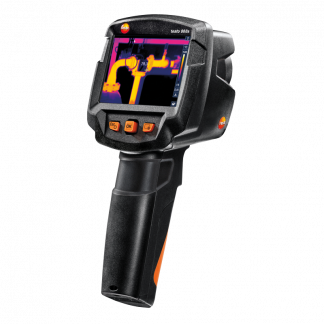


testo 860i – wireless thermal imaging camera for your mobile
Mobile thermal imaging camera that displays the thermal image via the testo Smart app.
- Easy and fast determination of Delta T in the thermal image using the application-specific measurement functions DeltaHeat and DeltaCool
- Razor-sharp thermal images thanks to high IR resolution (256 x 192 pixels)
- Everything is easy with the testo Smart app: simple handling and easy documentation via email directly at the measurement site
- Flexible handling through wireless use or one-hand operation, directly connected to a smartphone
- The testo 860i is also available as a measurement kit with a carrying case (item no. 0563 0860)
5 095
In stock
In stock
testo 860i – flexible thermal imaging camera for professional thermography
The new testo 860i wireless thermal imaging camera for smartphones is easy to use and displays images in the testo Smart appmaking it the perfect choice for quick checks in refrigeration and heating engineering, maintenance, construction engineering and many other applications.
The testo 860i enables quick and easy determination of the Delta T (temperature difference) in the thermal image with application-specific measurement functions:
- DeltaHeat for quick determination of the temperature difference between supply and return of radiators.
- DeltaCool for quick assessment of the temperature difference in refrigeration and air conditioning systems.
- The moisture situation also helps to assess the risk of moisture damage in indoor environments.
- The thermography function quickly and easily shows hotspots and Delta T during maintenance work.
With the testo 860i, you can quickly and easily identify hotspots in electrical installations and components. If you combine it with the testo 770-3 clamp ammeter, you can also measure the load and document it directly together with the thermal image – for a reliable assessment of the condition of the system.
The testo Smart app is used to control the testo 860i, display thermal images and temperature differences as well as for documentation – simple, fast and smart. testo 860i can be used flexibly, either directly connected to a mobile or tablet for one-handed use or separately. In addition, its robust design, high everyday usability and the rechargeable lithium battery with long operating time make testo 860i a reliable companion.
Så här underlättar testo Smart-appen för dig:
- Enkel inställning av mätinstrumentet
- Effektiv kund- och mätplatshantering
- Pålitlig lagring av alla mätdata
- Förvandlar mobilen till en andra skärm
- Visning av grafiska mätvärdeskurvor
- Enkel dokumentering av allt arbete
- Skicka rapporter direkt från mätplatsen via e-post
testo Smart-appen finns på Google Play och App Store. Den är gratis att både ladda ned och använda.


Scope of supply
The testo 860i wireless thermal imaging camera for mobiles, USB-C cable included.
| General technical data | |
| Protection class | IP54 |
| System requirements | requires iOS 17 or later; requires Android 14 or later; requires a mobile device with Bluetooth 4.0 |
| Infrared image output | |
| Field of view | 48° x 36° |
| Focus | Fixed focus |
| Minimum focus distance | 0.3 m |
| Image refresh rate | 9 Hz |
| Infrared resolution | 256 x 192 pixels |
| Thermal sensitivity | 50 mk |
| Spectral range | 8 … 14 µm |
| Visual image output | |
| Minimum focus distance | 0.4 m |
| Image size | 640 x 480 pixels |
| Image presentation | |
| Colors | iron, rainbow, rainbow HC, cold-warm, blue-red, gray, inverted gray, sepia, Testo, iron HAT, moisture palette |
| Digital zoom | Yes |
| Display options | IR image / real image (in testo Smart App) |
| Measurement | |
| Accuracy | ±3 °C or ±3 % of rdg. (at ambient temperature -10… +40 °C and object temperature 0… +150 °C or +100… +350 °C) |
| Emission factor | 0.01 … 1 |
| Measuring range | -20 … +350 °C |
| Reflected temperature | manual; (via testo Smart App) |
| Measuring function | |
| Analysis function | Hotspots/Coldspots, Delta T, up to 10 selectable individual measurement points, area measurement (min./max. in area) |
| Electrical mode – manual | Input of current value, voltage, or power |
| Humidity mode – manual | Yes |
| Moisture measurement with moisture meter | Automatic transfer from testo 605i or testo 625 via Bluetooth to the testo Smart App |
| Electrical measurement with clamp ammeter | Automatic transfer from the clamp meter testo 770-3 via Bluetooth to the testo Smart App |
| Application-specific measurement functions | DeltaHeat; DeltaCool; moisture mode (in testo Smart App) |
| Imaging equipment | |
| Full screen mode | Yes |
| WLAN connection | Communication with testo Smart App; WLAN: IEEE 802.11b/g/n* |
| Bluetooth | Peer-to-peer communication for fast connection* |
| Remote operation | Up to 10 m from the mobile device (via WLAN) |
| An overview of the radio authorizations in different countries can be found in the download section of the testo 860i product page in the document “Quick Start Guide testo 860i”. | |
| Image storage | |
| Image file format | .bmt; .jpg; .csv |
| Storage device | On a mobile device |
| Power supply | |
| Battery type | Integrated rechargeable Li-ion battery |
| Charging options | USB-C |
| Charging time | Approximately 90 min (15 min charging of an empty battery equals 30 min operating time) |
| Ambient conditions | |
| Humidity | 5 … 95 %RH, non-condensing |
| Vibration | IEC 60068-2-6 |
| Drop resistance | 1.5 m |
| Storage temperature | -20 … +70 °C |
| Operating temperature | -10 … +50 °C |
| Physical specifications | |
| Tripod mount | 1/4″ – 20UNC |
| Mobile device mount | Clamping range: min. 120 mm, max. 170 mm, and depth up to max. 12 mm |
| Weight | 195 g |
| Dimensions | 165 x 45 x 38 mm |
| PC software | |
| System requirements | Windows® 10; Windows® 11 |
| (testo IRSoft) | |
-

testo 605i – wireless moisture and temperature sensor
1 350 SKU 0560 2605 02SmartProbes for measuring moisture and temperature
- 0 … 100 %RH
- -20 … +60 °C
- Bluetooth range up to 100 m
-

testo 770-3 – clamp ammeter with power measurement (set)
2 995 SKU 0590 7703 02Current clamp ammeter with power measurement and Bluetooth
- Increased accuracy in the lower current range thanks to improved resolution
- TRMS measurement
- Automatic AC/DC for voltage and large two-line display


IRSoft 5.3 for all Testo thermal imagers
IRSoft enables you to analyze your thermal images in detail. Download the latest version of IRSoft to your PC and run the “Setup.exe” file to install the program. Please also refer to the installation tips below.
Important: To use the Testo 862 thermal imager, IRSoft version 5.3 or later is required.
If an older version of IRSoft is already on your PC, it will be updated to the latest version.
Installation tips
In most Windows versions, files are downloaded to a folder named “Downloads”. Move the downloaded ZIP file to C:/temp or directly to C:/ and extract it. Then right-click the EXE file and select “Run as administrator”. The installation will then start automatically. When everything is finished, a Testo folder should have been created in the Start menu, where you will find the new program icon.
Similar products

testo 860i – wireless thermal imaging camera, including carrying case
testo 860i Thermal Imaging Camera for Mobile Devices, including a handy carrying case.
- Easy and fast determination of Delta T in the thermal image using the application-specific measurement functions DeltaHeat and DeltaCool
- Razor-sharp thermal images thanks to high IR resolution (256 x 192 pixels)
- Everything is easy with the testo Smart app: simple handling and easy documentation via email directly at the measurement site
- Flexible handling through wireless use or one-hand operation, directly connected to a smartphone
- The testo 860i is also available for purchase without a carrying case (item no. 0560 0860)

testo 868s – smart and connected thermal imaging camera
The testo 868s thermal imaging camera has a high-quality 160 x 120 pixel detector. Which means 19,200 temperature measurement points that clearly indicate all critical areas.
- IR resolution 160 x 120 pixels
- testo SuperResolution (increases resolution up to 320 x 240 pixels)
- Wide measuring range: -30...+650 °C
- Thermography - basic course included!